
Specops uReset
Specops uReset enables Active Directory and Microsoft Entra ID users to reset forgotten passwords after verifying their identity through multi-factor authentication. Administrators configure policies that define the available authentication methods (identity services) and the level of verification required. This documentation covers uReset installation, configuration and administration.
Review the system requirements, then follow the installation guide for your environment. For supported authentication methods, see identity services.
For remote users in Active Directory environments, see VPN-less password reset for information about cached credential updates, access to saved application passwords, and activation and configuration requirements.
For employee onboarding in Active Directory environments, see First Day Password. This feature enables new users to set their first password before enrolling with identity services.
For product features and evaluation options, refer to the Specops uReset product page.
Central Concepts
Password Reset
The process of changing a forgotten password. A password reset can be performed by a user who verified their identity using multi-factor authentication. Users can reset their passwords through the uReset web application using a desktop or mobile web browser.
Authentication
Authentication is the process of verifying the identity of a user. Typically, this requires the user to make a claim about their identity by entering their username and password.
Enrollment
Users enroll with Specops Authentication using the identity services configured in their uReset policy. The enrollment process varies by identity service. For example, when users enroll manually with Mobile Code (SMS), they enter their mobile phone number and verify it using a code sent by SMS. For details about the available methods, see Specops Authentication Identity Services.
Multi-factor authentication
Multi-factor authentication requires more than one method of authentication from independent categories of credentials: something you know (i.e. password), something you have (i.e. Mobile device), and something you are (i.e. Fingerprint). Specops uReset goes beyond two-factor authentication by supporting a broad range of identity services that can be used to increase security and flexibility. The solution not only supports common authenticators, such as questions and answers, and mobile verification codes, but also various digital identity services ranging from personal identity services (e.g. LinkedIn) to company identity services (e.g. salesforce.com), in addition to higher trust methods such as Smart Cards. The Specops multi-factor authentication model is dynamic. Users can choose which identity services they want to combine for enrollment and authentication, as long as they meet the requirements of the policy. Users enrolled with more identity services than required for their authentication will have authentication choice. This guarantees that end-users will always have the ability to satisfy the authentication policy, even if an identity service is unavailable (e.g. not having their mobile phone nearby).
Administrators can select, based on role and security policy, which identity services/authenticators they want to extend to end-users to verify their identity when resetting or unlocking their accounts. Such flexibility can ensure that varying security and flexibility needs are met. For example:
- For users that have a low-level security clearance, but a high flexibility need, such as students, IT admins can allow them to authenticate with a few personal identity services such as their Google ID.
- For users that have a higher level security clearance, such as financial aid administrators or senior level executives, IT admins can assign policies that enforce a higher number, or a stronger combination of identity services. This approach provides administrators with the flexibility they need to enforce policies that translate to greater security and efficiency.
Policy
A policy contains the rules required for enrollment and multi-factor authentication. A policy controls what identity services can be used, and how many must be used to verify the identity of end-users. The system administrator is responsible for configuring the rules in the policies.
Identity services
Identity services are authentication methods that allow users to verify their identity in the Specops Cloud.
For more information, see Specops Authentication Identity Services.
Architecture and Design
Specops uReset uses the cloud-hosted Specops Authentication Web and backend services for both Active Directory and Microsoft Entra ID environments. Identity services verify users during authentication.
In Active Directory environments, the Specops Authentication Gatekeeper reads and writes user data in Active Directory, including enrollment data. In Microsoft Entra ID environments without traditional AD, no Gatekeeper is installed. For connection setup, see the Microsoft Entra ID integration guide.
Administrators configure authentication policies in Authentication Web. Active Directory environments can use Cloud Policy, Group Policy or both; Microsoft Entra ID environments without traditional AD use Cloud Policy. For policy configuration details, see Specops Authentication Web.
The following diagram shows the Active Directory deployment with the Gatekeeper. The cloud components described below are shared by both deployment types.
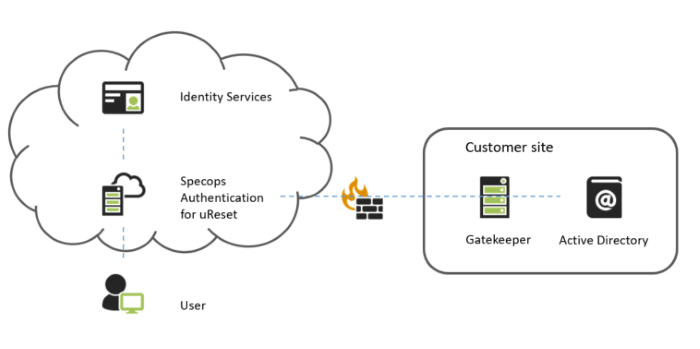
Authentication Cloud: The global cloud component of uReset, the authentication cloud contains the web (front-end for end users) and the backend services.
Authentication Web: Contains the front-end for end-users, and administrators. The Authentication Web can be used to view system information and manage various aspects of the product including system-wide configurations, and multi-factor authentication policies for various resources, including uReset.
Authentication Backend: Communicates with the web and identity services and validates a user’s identity based on tokens from individual identity services. In Active Directory environments, the backend communicates with the Gatekeeper to access user information.
Gatekeeper (Active Directory only): Installed on a server in your domain, the Gatekeeper reads user information and manages operations against Active Directory, such as reading and writing enrollment data. The Gatekeeper guidance here applies to version 8.0 or later.
Identity services: An entity that can validate a user’s identity in uReset. The tokens from individual identity services are used by the backend to validate a user’s identity.
Some of the identity services that are used during authentication, such as Google are external. When an external identity service is used, the user is sent to the identity service, and asked to give Specops consent to access their personal information, such as their username. The information from the consent allows the creation of the token that is used for authentication.
Token: A token or a security token is a carrier of information about a user and about the issuer of the token. The information about a user is a set of statements. The claims about a user can for example be the name of the user, ID of the customer it belongs to and what roles a user has in its organization.
Note
No personally identifiable data or passwords are included in the tokens.
Features and capabilities
Reporting
The uReset Reporting feature allows you to track your enrollment process and provides several reports on enrollments, events, and identity service utilization.
Customizations
The uReset web application contains several customization features which give you control over the Specops uReset end user interface. You can customize the graphical elements of the Specops uReset web application including main logo. You can also customize the text displayed to the end user, for all supported languages.
Event Notifications
Specops uReset can send email or text message notifications to users and administrators when system events occur. For example, it can confirm that a user has reset their password or unlocked their account, or remind users with insufficient enrollment to enroll. Administrators configure notifications in Authentication Web for the Cloud Policy or individual Group Policies. For configuration instructions, see Specops Authentication Web.
Weighted Identity Services
The uReset multi-factor authentication engine allows the administrator to assign a specific weight for each identity service, ultimately deciding that one identity service is worth twice as much as another during authentication. In the user interfaces, for both the end users and administrator, the weights are represented by stars.
Multifactor Authentication for Administrators and Helpdesk users
Users that are a part of the Administrators and Helpdesk group can use multifactor authentication to verify their identity when accessing the Administrator / User Management pages on the Authentication Web.
Cached Credentials: Reset a password remotely
If a user is away from the office and forgets their password, they need to be able to reset it without coming back to the office.
Under ordinary circumstances, when a user signs in to a domain joined computer while in the office, a cached copy of their password hash is stored locally. This allows the computer to verify the user, even if a Domain Controller cannot be reached for authentication.
However, if the user is away from the office, they reset their Active Directory password, and a Domain Controller cannot be reached, the new password will not be present in the cache on the local computer. In this scenario, a user that has forgotten their old password will be locked out of their computer.
Specops uReset and Specops Password Reset can update the cached credentials even when a Domain Controller cannot be reached. This can be done from the Reset Password link on the login screen of a machine where the Specops Client is installed.
Mobile Applications
uReset contains a mobile application, available in Windows Store, Google Play, and App Store, that can be used as a secure alternative to reset passwords and unlock accounts. The mobile app is available to any organization that permits users to reset their password remotely:
- Specops Password Reset
The following mobile applications are further described in Specops Authentication Identity Services:
- Specops:ID
- Specops Authenticator (being phased out, it is recommended to use Specops:ID)
- Specops Fingerprint (being phased out, it is recommended to use Specops:ID)