
Specops Key Recovery
Specops Key Recovery is a self-service solution for unlocking computers encrypted or managed by Symantec Endpoint Encryption or Microsoft BitLocker. A user who is locked out at the pre-boot authentication screen can use Specops Key Recovery to unlock their computer, without calling the helpdesk. For added security, users are verified with multi-factor authentication. The solution supports a number of authentication factors, including Symantec VIP, and Mobile Code (SMS) (sending a one-time code to a mobile device).
Specops Key Recovery currently supports:
- Symantec Endpoint Encryption (version 11 and higher)
- BitLocker managed by Symantec Endpoint Encryption (version 11 and higher)
- BitLocker
Central concepts
Pre-boot authentication screen
When a user powers on a computer with full-disk encryption, the pre-boot authentication screen will appear. Windows may not boot up until the user has correctly confirmed their identity on this screen.
Authentication
Authentication is the process of verifying the identity of a user. Typically, this requires the user to make a claim about their identity by entering their username and password.
Enrollment
Users are required to enroll with Specops Authentication. The enrollment process will vary for each type of identity service. To enroll with a personal identity service such as Google, users will need to follow the link from the Specops web application to the Google web page, and log in with the email address and password associated with their Google account.
Multi-factor authentication
Multi-factor authentication requires more than one method of authentication from independent categories of credentials: something you know (i.e. password), something you have (i.e. Mobile device), and something you are (i.e. Fingerprint). Specops uReset goes beyond two-factor authentication by supporting a broad range of identity services that can be used to increase security and flexibility. The solution not only supports common authenticators, such as questions and answers, and mobile verification codes, but also various digital identity services ranging from personal identity services (e.g. LinkedIn) to company identity services (e.g. salesforce.com), in addition to higher trust methods such as Smart Cards. The Specops multi-factor authentication model is dynamic. Users can choose which identity services they want to combine for enrollment and authentication, as long as they meet the requirements of the policy. Users enrolled with more identity services than required for their authentication will have authentication choice. This guarantees that end-users will always have the ability to satisfy the authentication policy, even if an identity service is unavailable (e.g. not having their mobile phone nearby).
Administrators can select, based on role and security policy, which identity services/authenticators they want to extend to end-users to verify their identity when resetting or unlocking their accounts. Such flexibility can ensure that varying security and flexibility needs are met. For example:
- For users that have a low-level security clearance, but a high flexibility need, such as students, IT admins can allow them to authenticate with a few personal identity services such as their Google ID.
- For users that have a higher level security clearance, such as financial aid administrators or senior level executives, IT admins can assign policies that enforce a higher number, or a stronger combination of identity services. This approach provides administrators with the flexibility they need to enforce policies that translate to greater security and efficiency.
Policy
A policy contains the rules required for enrollment and multi-factor authentication. A policy controls what identity services can be used, and how many must be used to verify the identity of end-users. The system administrator is responsible for configuring the rules in the policies.
Identity services
Identity services are authentication methods that allow users to verify their identity in the Specops Cloud.
For more information, see Specops Authentication Identity Services.
Architecture and Design
Specops Key Recovery is a component of the Specops Cloud. Specops Authentication, another component of the Specops Cloud, is used to authenticate to Specops Key Recovery. Authentication rules for accessing Specops Key Recovery can be defined on the Admin pages in the Specops Cloud.
To read user information from Active Directory, the Specops Cloud communicates with the Gatekeeper. The Gatekeeper is installed on a server in your domain. The Gatekeeper reads user information from Active Directory, and manages all operations against Active Directory, such as reading/writing enrollment data.
Key recovery for Symantec Endpoint Encryption
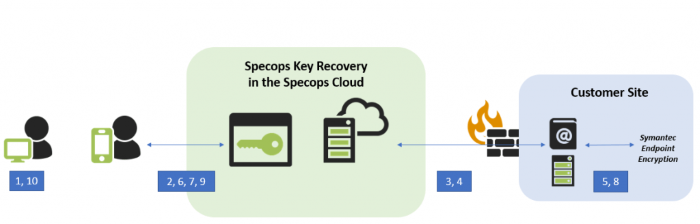
- The user forgets their password, and is locked out at the pre-boot authentication screen. The screen prompts the user to visit Specops Key Recovery on a mobile device.
- Specops Key Recovery (keyrecovery.specopssoft.com) redirects the user to Specops Authentication.
- Specops Authentication asks the Gatekeeper for the Group Policy Object that affects the user, and obtains the authentication rules to grant access to Specops Key Recovery. The authentication rules are displayed for the user. The user authenticates with various identity services to fulfill the policy, after which, the user is returned to Specops Key Recovery.
- Specops Key Recovery asks the Gatekeeper for a list of the user’s devices.
- The Gatekeeper asks Symantec Endpoint Encryption for the user’s devices, and a list is returned. The user’s computers are displayed on the key recovery page (keyrecovery.specopssoft.com).
- The user selects their locked computer from the list in Specops Key Recovery, and the browser is redirected to the recovery page.
- The user enters a sequence number on their mobile device and presses Continue. A key-pair is generated and the public key is sent with the sequence number to the Gatekeeper.
- The Gatekeeper asks Symantec Endpoint Encryption for a Recovery Key, based on the information the user has provided.
- Specops Key Recovery displays the Recovery Key to the user and instructs them to enter information on their locked computer.
- The user enters the Recovery Key on their locked computer. The computer then is unlocked.
Key recovery for BitLocker
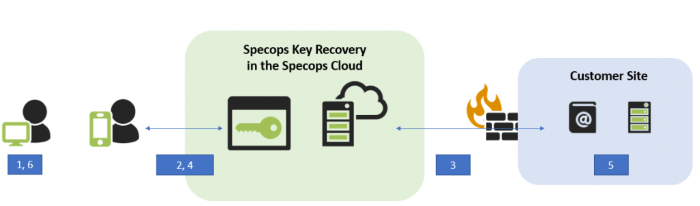
- The user forgets their password and navigates to Specops Key Recovery on a mobile device.
- Specops Key Recovery redirects to login.specopssoft.com.
- Specops Authentication asks the Gatekeeper for the Group Policy Object (GPO) that affects the user, and obtains the authentication rules to grant access to Specops Key Recovery. Authentication rules are displayed for the user and the user authenticates with various identity services, after which, they are returned to Specops Key Recovery.
- Specops Key Recovery asks the user to provide the first 8 characters of the Recovery Key ID, visible on their computer. The user enters the Recovery Key ID and presses Continue. A public key is generated and is sent together with the Recovery Key ID to the Gatekeeper.
- The Gatekeeper queries Active Directory to find the recovery password for the user’s computer. The recovery password is encrypted on the Gatekeeper, and then decrypted and displayed on the user’s mobile device.
- The user enters the recovery password on their locked computer. The computer is then unlocked.