
Key Components
Specops Password Policy consists of the following components and does not require any additional servers or resources in your environment.
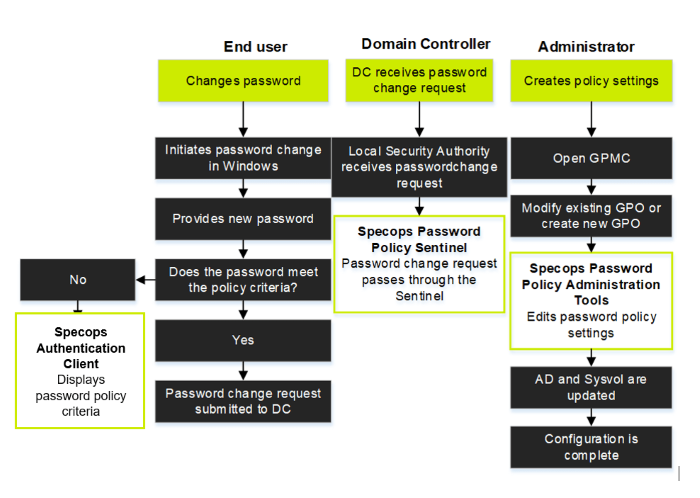
Specops Password Policy Administration Tools
The Specops Password Policy Administration Tools include Specops Password Policy Domain Administration, a graphical user interface, and a PowerShell 5.1 module with cmdlets for programmatic administration. Administrators can use these tools to set up and manage Specops Password Policy and configure password policy settings in Group Policy Objects.
The PowerShell module includes CefSharp, a Chromium-based framework used to generate PDF reports. CefSharp is installed as part of the Specops Password Policy Administration Tools MSI and does not require a separate installation.
Specops Password Policy Sentinel
The Specops Password Policy Sentinel is an installation package that must be installed on all writable domain controllers in a domain.
The Specops Sentinel consists of the Sentinel Password Filter, and the Sentinel Service.
- Sentinel Password Filter: The Sentinel Password Filter is a Windows Password Filter that verifies whether a new password matches the Specops Password Policy settings assigned to the user.
- Sentinel Service: The Sentinel Service is installed on every domain controller as part of the Specops Password Policy.
For more information, see the Password Policy Sentinel page.
Specops Client
(Formerly known as the Specops Password Client or the uReset Client) Displays the password policy rules when a user fails to meet the policy criteria when changing their password. The Client also notifies users when their passwords are about to expire.
For more information, see Specops Client.
Specops Password Arbiter
The Specops Arbiter acts as a gateway between the Sentinel Service and the Specops Breached Password Protection Cloud API, where the list of leaked passwords is found. The Specops Arbiter uses a customer unique API key to communicate with the Breached Password Protection Cloud API.
Note
The Specops Password Arbiter should only be installed if you are using the Specops Breached Password Protection add-on.
For more information, see Specops Password Arbiter.