
URL Allowlists
Specops Authentication is the hybrid cloud platform that serves as the foundation for uReset, Secure Service Desk, Secure Access, and Key Recovery. This section describes the network requirements and the URLs that must be accessible through the firewall to enable connection to Specops Authentication.
Note
It is strongly recommended to use URL or hostname-based allowlists, as IP addresses may change over time.
Internal communication
The computer running the Gatekeeper Admin Tool must be able to reach the Gatekeeper server.
| Source | Destination | Protocol | Port |
|---|---|---|---|
| Gatekeeper Admin Tool(s) | Gatekeeper Server(s) | TCP | 6003 |
North America Data Center
Gatekeeper server URLs
The Gatekeeper server needs access to the following URLs:
| URL | Protocol | Port |
|---|---|---|
| https://login.specopssoft.com | TCP | 443 |
| https://gk.specopssoft.com | TCP | 443 |
| https://download.specopssoft.com | TCP | 443 |
End user URLs
The end user client workstations need access to the following URLs:
| URL | Product | Protocol | Port |
|---|---|---|---|
| https://login.specopssoft.com | All Specops Authentication products | TCP | 443 |
| https://servicedesk.specopssoft.com | Secure Service Desk | TCP | 443 |
| https://keyrecovery.specopssoft.com | Key Recovery | TCP | 443 |
| https://mfa.specopssoft.com | Secure Access / MFA for Windows | TCP | 443 |
| https://authapi.specopssoft.com | Secure Access / MFA for Windows | TCP | 443 |
| https://onboarding.specopssoft.com | First Day Password | TCP | 443 |
| https://trust.specopsauthentication.com | All Specops Authentication products | TCP | 443 |
| https://*.trust.specopsauthentication.com | All Specops Authentication products | TCP | 443 |
If end users/workstations are behind a proxy that requires authentication, it may be necessary to bypass authentication for these URLs so that end users who cannot authenticate due to a password issue can still access the Reset Password web page.
Mobile phone access
If using the Specops:ID mobile app over wifi, it needs access to the following URLs:
| URL | Protocol | Port |
|---|---|---|
| https://specopsid.specopssoft.com | TCP | 443 |
| https://authapi.specopssoft.com | TCP | 443 |
For mobile phone push notifications to work, the Specops:ID mobile app must be able to reach its push notification service:
- For Android, Google's Firebase Cloud Messaging service (FCM) must be reachable. Note that proxy servers are not supported; the phone must be able to connect directly to FCM. See https://firebase.google.com/docs/cloud-messaging/network-configuration#network-for-android-devices.
- For iOS, Apple's Push Notification Service (APNs) must be reachable. See https://support.apple.com/en-us/102266.
If using Specops Verified ID from the Specops:ID mobile app, it needs access to the following URLs:
| URL | Protocol | Port |
|---|---|---|
| https://faceapi.specopssoft.com | TCP | 443 |
| https://docsapi.specopssoft.com | TCP | 443 |
| https://lic.regulaforensics.com | TCP | 443 |
| https://lic2.regilaforensics.com | TCP | 443 |
Certificate CRL endpoints for Gatekeeper
The Gatekeeper servers need access to the following URLs to check for upgrades and verify certificates against CRLs:
| URL | Protocol | Port |
|---|---|---|
| https://*.c.lencr.org | TCP | 443 |
| http://*.c.lencr.org | TCP | 80 |
| https://crl.godaddy.com | TCP | 443 |
| http://crl.godaddy.com | TCP | 80 |
Certificate CRL endpoints for end user workstations
The client workstations need access to the following URLs to check for upgrades and verify certificates against CRLs:
| URL | Protocol | Port |
|---|---|---|
| https://*.c.lencr.org | TCP | 443 |
| http://*.c.lencr.org | TCP | 80 |
Static IP addresses
If you have to use IP address rules, you must allow both Gatekeepers and End users access to the following IP address spaces. More granular filtering is not supported, as exact IP addresses within these ranges are subject to change at any time.
These IP addresses do not cover the
- 52.180.65.88/29 (Azure US West)
- 40.71.57.208/29 (Azure US East)
EU Data Center
Gatekeeper server URLs
The Gatekeeper server needs access to the following URLs:
| URL | Protocol | Port |
|---|---|---|
| https://eu.login.specopssoft.com | TCP | 443 |
| https://eu.gk.specopssoft.com | TCP | 443 |
| https://download.specopssoft.com | TCP | 443 |
End user URLs
The end user client workstations need access to the following URLs:
| URL | Product | Protocol | Port |
|---|---|---|---|
| https://eu.login.specopssoft.com | All Specops Authentication products | TCP | 443 |
| https://eu.servicedesk.specopssoft.com | Secure Service Desk | TCP | 443 |
| https://eu.keyrecovery.specopssoft.com | Key Recovery | TCP | 443 |
| https://eu.mfa.specopssoft.com | Secure Access / MFA for Windows | TCP | 443 |
| https://eu.authapi.specopssoft.com | Secure Access / MFA for Windows | TCP | 443 |
| https://eu.onboarding.specopssoft.com | First Day Password | TCP | 443 |
| https://eu.trust.specopsauthentication.com | All Specops Authentication products | TCP | 443 |
| https://*.eu.trust.specopsauthentication.com | All Specops Authentication products | TCP | 443 |
If end users/workstations are behind a proxy that requires authentication, it may be necessary to bypass authentication for these URLs so that end users who cannot authenticate due to a password issue can still access the Reset Password web page.
Mobile phone access
If using the Specops:ID mobile app over wifi, it needs access to the following URLs:
| URL | Protocol | Port |
|---|---|---|
| https://eu.specopsid.specopssoft.com | TCP | 443 |
| https://eu.authapi.specopssoft.com | TCP | 443 |
For mobile phone push notifications to work, the Specops:ID mobile app must be able to reach its push notification service:
- For Android, Google's Firebase Cloud Messaging service (FCM) must be reachable. Note that proxy servers are not supported; the phone must be able to connect directly to FCM. See https://firebase.google.com/docs/cloud-messaging/network-configuration#network-for-android-devices.
- For iOS, Apple's Push Notification Service (APNs) must be reachable. See https://support.apple.com/en-us/102266.
If using Specops Verified ID from the Specops:ID mobile app, it needs access to the following URLs:
| URL | Protocol | Port |
|---|---|---|
| https://eu.faceapi.specopssoft.com | TCP | 443 |
| https://eu.docsapi.specopssoft.com | TCP | 443 |
| https://lic.regulaforensics.com | TCP | 443 |
| https://lic2.regilaforensics.com | TCP | 443 |
Certificate CRL endpoints for Gatekeeper
The Gatekeeper servers need access to the following URLs to check for upgrades and verify certificates against CRLs:
| URL | Protocol | Port |
|---|---|---|
| https://*.c.lencr.org | TCP | 443 |
| http://*.c.lencr.org | TCP | 80 |
| https://crl.godaddy.com | TCP | 443 |
| http://crl.godaddy.com | TCP | 80 |
Certificate CRL endpoints for end user workstations
The client workstations need access to the following URLs to check for upgrades and verify certificates against CRLs:
| URL | Protocol | Port |
|---|---|---|
| https://*.c.lencr.org | TCP | 443 |
| http://*.c.lencr.org | TCP | 80 |
Static IP addresses
If you have to use IP address rules, you must allow both Gatekeepers and End users access to the following IP address spaces. More granular filtering is not supported, as exact IP addresses within these ranges are subject to change at any time.
These IP addresses do not cover the
- 13.79.75.152/29 (Azure North Europe)
- 74.234.213.168/29 (Azure West Europe)
Proxy/SSL Inspection Requirements
Gatekeepers can use a web proxy to access the URLs. If proxy authentication is required, ensure both the administrator installing the Gatekeeper and the Gatekeeper service account are authorized and no captive portals are required.
SSL inspection/MITM certificates are not supported. If the certificate presented for the URLs has been modified in any way, the Gatekeeper server will refuse to connect.
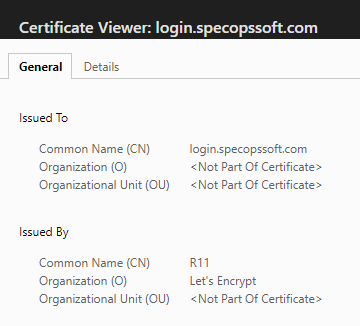
Confirm that your connection is properly configured:
- Browse to https://login.specopssoft.com from a web browser on your Gatekeeper server.
- The steps differs depending on web browser. In Microsoft Edge, click the padlock in the address bar, then click Connection is secure.
- Click the certificate icon to view certificate details.
-
The certificate issuer should match this:
Multi Domain Environments
If you have a multi-domain setup that is behind firewall, you will need to ensure that the ports listed are allowed from the Gatekeeper(s) to all of the DC’s in the target trusted domain.
| Service | Protocol | Port |
|---|---|---|
| LDAP | TCP | 389, 636 |
| SMB2 | TCP | 445 |
| Kerberos | TCP | 88, 464 |
| DNS | TCP/UDP | 53 |