

How to move mobile Numbers to be stored in the encrypted leaf object
You can choose to store it in the encrypted leaf object, by updating this setting:
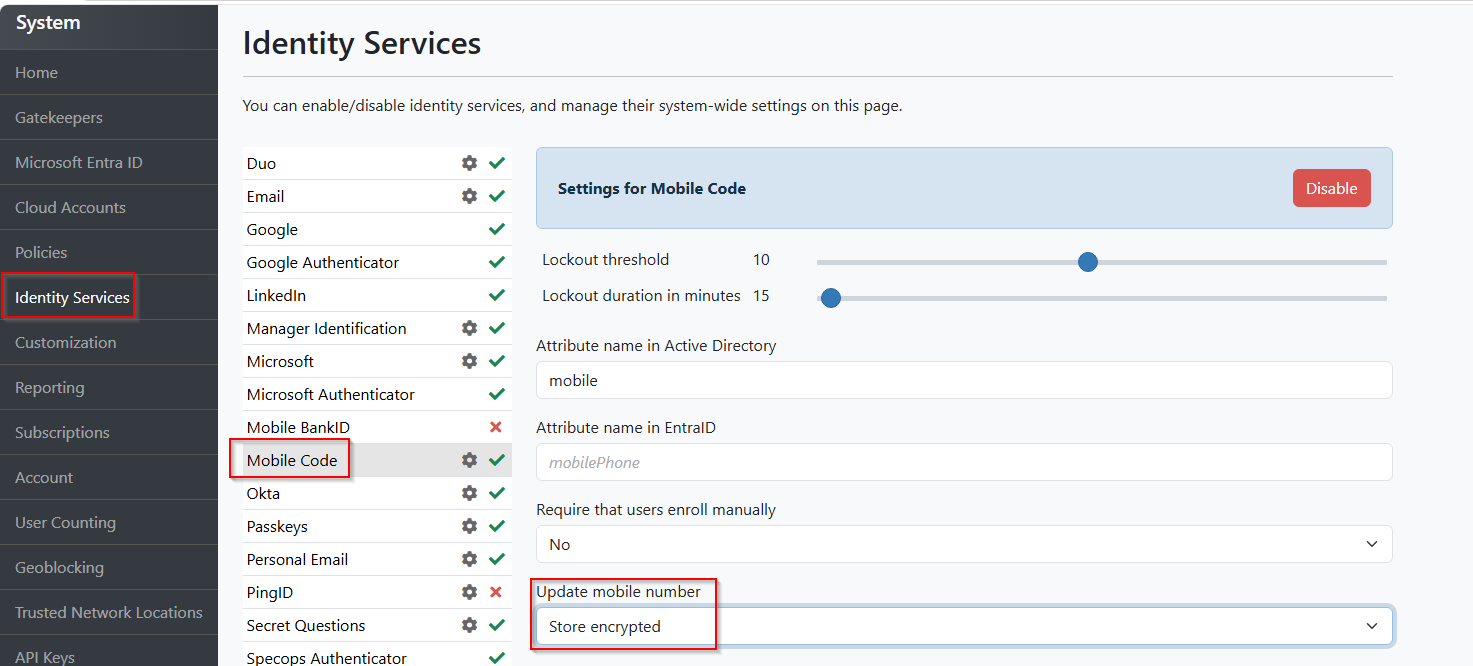
This script will export the user’s samaccountname and mobile number into a CSV:
Get-ADUser -Filter * -Properties Mobile | Select-Object Samaccountname, Mobile |Export-Csv "C:\Temp\users.csv"With this export it is advised to validate the information is indeed correct and that everyone, who you need to populate within this new method has a number. If not, you are able to add them to this manually or make any updates within this CSV before continuing.
After the data is validated, this script can be run to import the data into the respective leaf objects of the users in bulk:
$CsvPath = "C:\Temp\users.csv"
$GatekeeperServer = "arlenserver1.arlen.com"
$LogPath = "C:\Temp\SpecopsMobileLog.csv"

# Create log file with headings
"Date/Time,Status,Username,Mobile,Message" |
Set-Content -Path $LogPath

Import-Csv -Path $CsvPath | ForEach-Object {

    $Username = $_.samaccountname
    $Mobile   = $_.mobile

    try {
        Add-SAMobileCodeEnrollment `
            -Username $Username `
            -MobileNumber $Mobile `
            -GatekeeperServer $GatekeeperServer `
            -ErrorAction Stop

        "$(Get-Date -Format 'yyyy-MM-dd HH:mm:ss'), SUCCESS,$Username,$Mobile, Enrollment successful" |
            Add-Content -Path $LogPath
    }
    catch {
        "$(Get-Date -Format 'yyyy-MM-dd HH:mm:ss'),FAILED,$Username, $Mobile,$($_.Exception.Message)" |
            Add-Content -Path $LogPath
    }
}
Alternatively you can store the mobile number in another attribute with the instructions here: https://specopssoft.com/knowledge-base/specops-authentication/moving-specops-authentication-mobile-numbers-to-a-custom-attribute/.