

Our dedicated Product Specialist team is always ready to help you when you need it the most.
Contact Support
How to configure the Specops Client with Password Policy to use Entra SSPR
To do so first, the ADMX templates will be needed:
Where do I get the ADMX templates?
For clients who do regularly connect to the corporate LAN or VPN, we recommend using the Specops Client ADMX template to configure these settings. You can follow the instructions here: https://specopssoft.com/knowledge-base/specops-authentication-client/where-do-i-get-the-admx-templates/
Client Install
In addition to the client, ensure you download Cefsharp runtime installer (for Secured Browser) from https://specopssoft.com/support/specops-client/download/
In a GPO applied to all machines targeted for the client deployment, please set all of the following settings to Enabled:
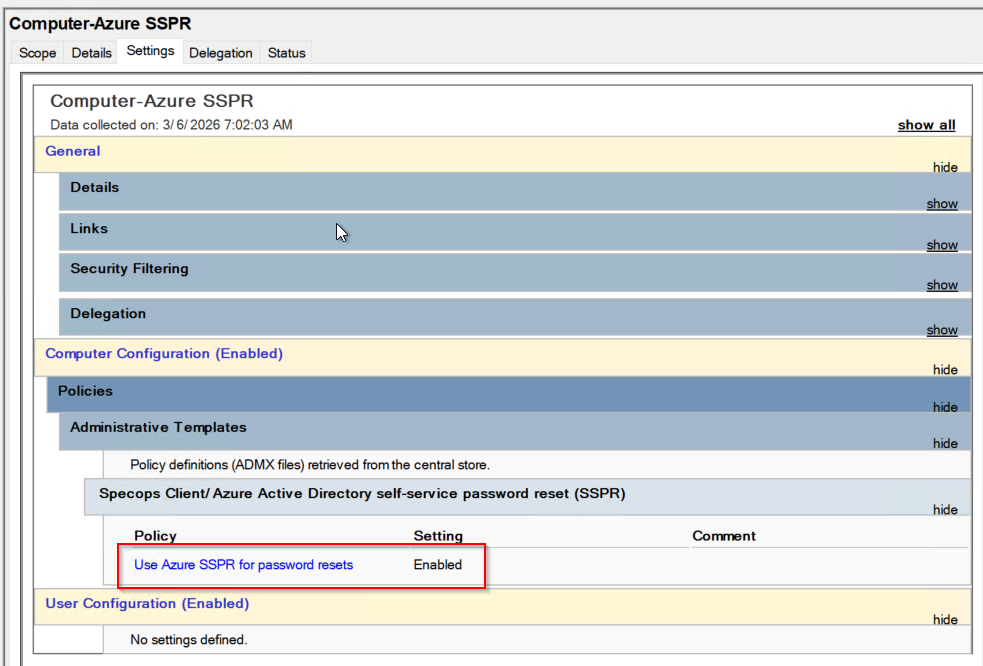
It is also possible to do this via the registry by setting the following values:
[HKEY_LOCAL_MACHINE\SOFTWARE\Policies\Specopssoft\uReset\Client\Settings]
EnableAzureADSelfServicePasswordReset="=dword:00000001"