Specops uReset

Are password resets and account lockouts exhausting valuable IT resources? Let users address common tasks related to password management including Active Directory self-service password resets, changes, and account lockouts. With Specops uReset, you can revolutionize password resets with a flexible authentication engine, and ensure that users always have a secure way to reset their password, regardless of location, device, or browser.


Download Free Trial

Password reset calls to the helpdesk drive service desk costs.

  • 40% of all helpdesk calls are related to password resets (Gartner)
  • $1 million – amount large organizations spend up to per year on staffing and infrastructure to handle password resets alone (Forrester)
  • $70 – cost of one password reset call (Forrester)

Updates the locally cached credential

One of the most time consuming and expensive password-related calls to the service desk is a local cached credential issue. Specops uReset updates the local cached credential, eliminating this service desk call.

92%
Remote work will be permanent for ninety-two percent of organizations in the next two years.

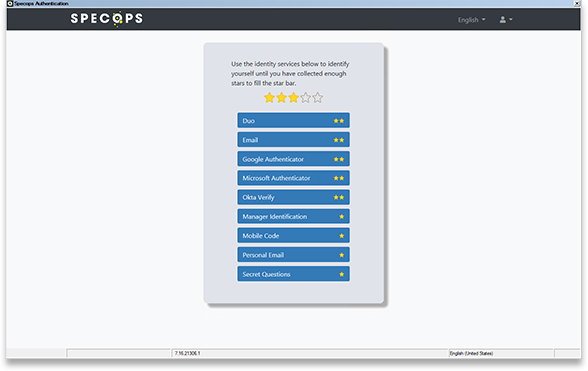
MFA platform with over 20 authentication factors

Available out of the box, including OTP, SMS, trusted network location, manager identification, hardware tokens, 3rd party identity providers like Okta, Ping, Duo, and more.

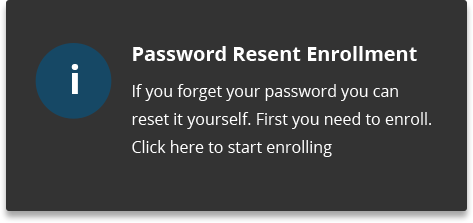
Easy enrollment

Organizations can make use of information they already have – whether that’s AD attributes like mobile codes or an existing 3rd party identity provider to pre-enroll users in Specops uReset. Specops uReset also includes customizable enrollment reminder options from tooltip pop-up to unclosable browser window to help complete enrollment to other factors.

Request Demo

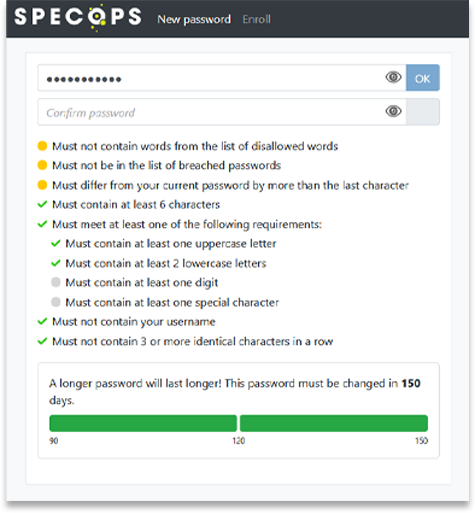
Dynamic Feedback at Reset

Clear and dynamic feedback at password reset means your self-service password reset solution won’t keep users calling the service desk about why their new password is rejected. Integrates well with Specops Password Policy and Breached Password Protection rules including length-based password aging + breached password check but can also be used without those products.

Security Features

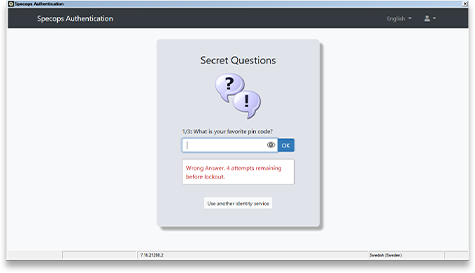
Specops uReset supports security features like masking the password as the user types it (prevents “shoulder-surfing” insider attack), not displaying security questions all at once (prevents social engineering attacks), and supports customizable lockout on failed authentication per identity service.

Contact Support

Self Service Account Unlocks

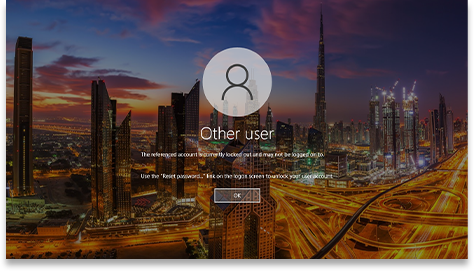
Forgotten passwords can often mean user lockouts from too many bad guesses. Specops uReset not only solves for the self-service password reset scenario but can also lift the burden from the service desk for lockouts.

Comparison Chart

Feature highlights Specops uReset Azure AD self-service password reset
OOTB 3rd party identity services e.g. Duo Security, Okta Verify Symantec VIP, PingID Yes yes
Updates locally cached credentials (remote) Yes No
Enrollment enforcement Yes Yes (only during O365 login)
Enrollment notifications Yes (Email, SMS, balloon tip) Yes (Email)
Helpdesk reset interface Yes No
Reporting Yes Yes
Breached Password Protection validation Yes, over 5 billion previously leaked passwords are blocked No, allows use of leaked passwords based on scoring algorithm
Dynamic password policy display Yes No, users are provided with very little guidance

Features


  • Accessible from any web browser, the Windows logon screen, the mobile app
  • Updates the local cached credentials for remote users
  • Helpdesk interface for verifying users, unlocking user accounts and setting temporary passwords
  • Enrollment enforcement and auto-enrollment options
  • Enrollment notifications via system tray, email, or unclosable fullscreen browser
  • Statistics and audit reporting to view usage and track system events
  • User interface available in multiple languages including German, French, Spanish, Japanese, simplified Chinese, and many more
  • 15+ identity providers to enable authentication choice and increase security
  • Customizable user interface, change the text, logo, and colors
  • Google re-CAPTCHA to prevent username harvesting

Enroll and reset your password with Specops uReset

Videos
Specops uReset revolutionizes self-service password reset by enabling authentication choice. With support of over 20 identity  services that can be weighted and layered to increase identity security and end-users understanding of it, uReset guarantees that your end-users will always be able to complete the reset/account unlock task in the most secure and intuitive manner. The solution also supports pre-enrollment options to ensure immediate adoption and the ease of mind that your users can and will access the system effectively – anytime, anywhere from any internet connected device.

Reviews

Gold Award on Techgenix.com!

Brien Posey, I found the software to be stable, reliable, and very responsive. I did not encounter any bugs during my review, and the software was intuitive to the point that I was able to use it without ever looking at the instructions or calling tech support.

Read Full Review

Vulnérabilités FTP du port TCP 21

5/5 rating and Gold Award on WindowSecurity.com

Richard Hicks, For such a powerful tool, this product is quick and simple to install and configure. In just a few minutes you’ll have online password reset with multiple third-party identity providers.

Read Full Review

Gold Award on Techgenix.com!

Nuno Mota, Specops Secure Service Desk delivers on its promise. It helps organizations enforce secure user verification through stronger authentication methods.

Read Full Review

Expert review on 4sysops.com!

Brandon Lee, I found the features of Specops Secure Service Desk to be excellent for organizations looking to improve the security of service desk operations and bolster their password reset solution.

Read Full Review

Try it for FREE, today!

Please fill in your information to start your free trial. All fields are mandatory.

Additional Resources

× Close

Interested in learning more about Specops uReset?

Read more about Self-service Password Reset No, thank you.