

Error: Security Support Provider Interface (SSPI) authentication failed.
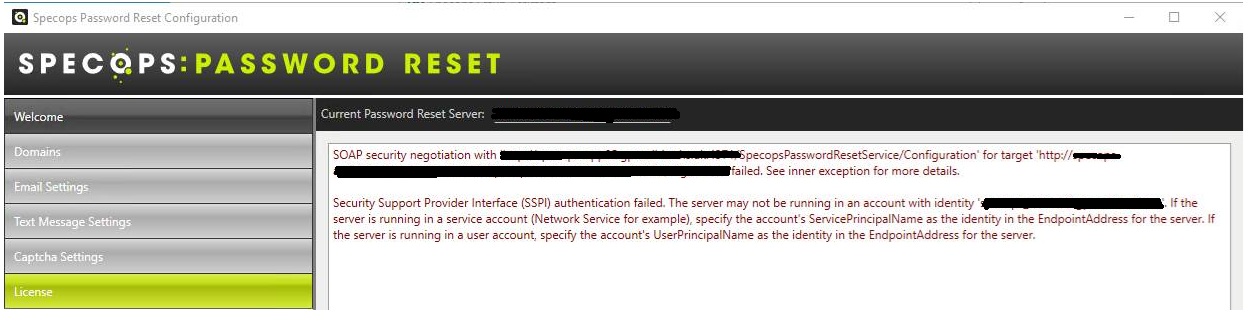
Error message in Specops Password Reset Configuration:
SOAP security negotiation with ‘http://server01.domain.local:4371/SpecopsPasswordResetService/Configuration’ for target ‘http://server01.domain.local:4371/SpecopsPasswordResetService/Configuration’ failed. See inner exception for more details.
Security Support Provider Interface (SSPI) authentication failed. The server may not be running in an account with identity ‘specops_service@domain.local’. If the server is running in a service account (Network Service for example), specify the account’s ServerPrincipalName as the identity in the EndpointAddress for the server. If the server is running in a user account, specify the account’s UserPrincipalName as the identity in the EndpointAddress for the server.
Root Cause
The issue is caused by a recent Microsoft security hardening update affecting Kerberos authentication:
The service account used by the application is not configured to support modern Kerberos encryption types (AES 128/256). It effectively relies on legacy RC4 encryption.
Microsoft’s security update tightens Kerberos encryption requirements, and the domain controller stops issuing service tickets using weaker encryption. As a result, the Specops Password Reset Admin tools (which are WCF-based) fail during SSPI/Kerberos security negotiation, producing the “SSPI authentication failed” error.
The core password reset functionality continues to work because it does not rely on the same strict Kerberos negotiation path as the Admin tools.
Resolution
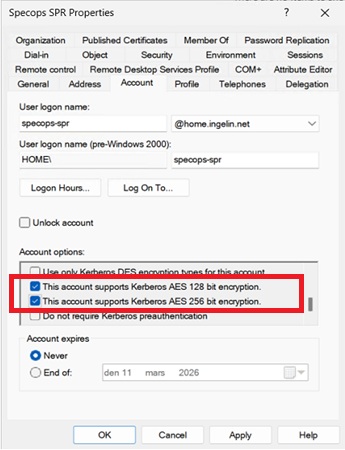
1. Enable AES 128 and AES 256 Kerberos encryption support on the service account in Active Directory by ticking the following two Account options:
This account supports Kerberos AES 128 bit encryption
This account supports Kerberos AES 256 bit encryption
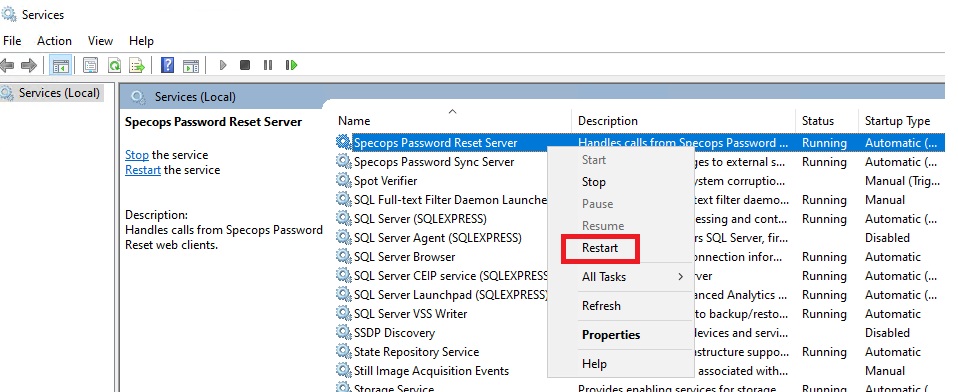
2.Restart the Specops Password Reset Service
This allows the domain controller to issue modern AES-encrypted Kerberos tickets, restoring successful authentication and resolving the issue.