

Our dedicated Product Specialist team is always ready to help you when you need it the most.
Contact Support
How to download the express list in an Air-gapped network
Many customers have requirements to download the express list offline due to air-gapped network requirements and with that, it is possible to download the express list from a computer with internet access utilizing this PowerShell script:
- You will need 7.6 GB of space as of September 2026
- Create a folder called “BPP” under c:\temp and then run the Powershell script below:
$folder = "C:\BPP\DefaultBlacklist"
$blurl = 'https://download.specopssoft.com/Dictionary/Blacklist'
$blver = Invoke-RestMethod -Uri  "$blurl/currentVersion.json"
$urlver = $blver.CurrentVersion

$startTime = (Get-Date)
$ProgressPreference = 'SilentlyContinue'
for($i=0; $i -le 255 ; $i++)
{
    $shex= ([String]::Format("{0:x}", $i)).ToUpper()
    if ($shex.length -eq 1)
    {
        $shex = "0$shex"
    }
    $filename = "$shex.bin"
    Write-Output $filename
    Invoke-WebRequest -Uri "$blurl/$urlver/$filename"  -OutFile $folder\$filename
}
Invoke-WebRequest -Uri "$blurl/$urlver/metadata.json" -Outfile $folder\metadata.json
$endTime = (Get-Date)
Write-Verbose "Specops blacklist files sucessfully downloaded to $folder in $(($endTime-$startTime).minutes) minutes and $(($endTime-$startTime).seconds) seconds" -Verbose
The output of the script will look like this:

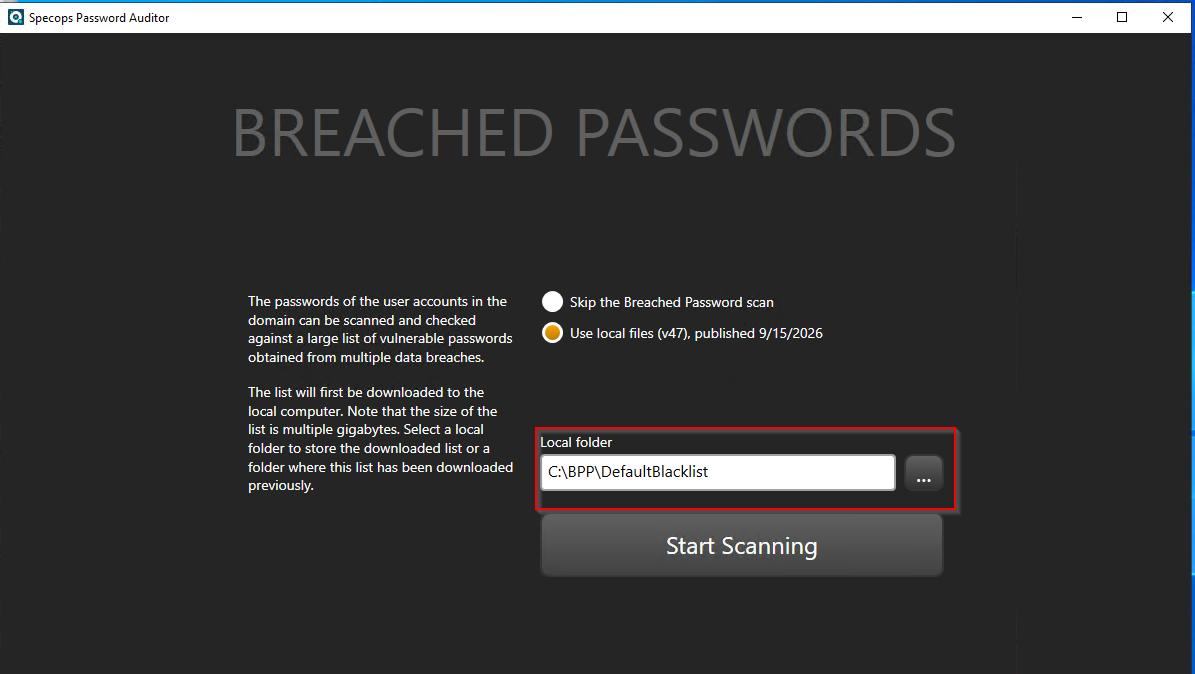
For Password Auditor:
Launch Password Auditor and update the file path for the breached password scan:
For Password Policy:
From here you can copy the DefaultBlacklist folder to your local sysvol and overwrite the contents to update the list:
C:\Windows\SYSVOL\domain\Policies\SpecopsPassword\Dictionaries\DefaultBlacklist