

This website uses cookies to ensure you get the best experience on our website. Learn more

Beyond breach prevention: The hidden ROI of password policy tools
Table of Contents

Last updated on January 19, 2026
When you’re building the business case for a password policy tool, the conversation usually starts and ends with breach prevention. And fair enough, as according to IBM’s 2025 Cost of a Data Breach Report, the average breach costs organizations $4.4 million. Preventing even one incident makes the investment worthwhile.
But here’s what gets overlooked: the same features that strengthen your security can also slash your operational costs. The right password policy tool doesn’t just stop breaches. It can actually reduce the tangible expenses that pile up every time your end users call the helpdesk.
The password policy cost trap
Most organizations experience the same frustrating pattern when they tighten their password policies. Security improves, but helpdesk tickets surge. Users struggle with new complexity requirements. They can’t remember which special characters are allowed. They reset their passwords every 90 days, often reverting to predictable patterns like adding “1!” to their old password.
Each failed attempt means another support ticket. Research from Forrester indicates password resets account for up to 30% of all helpdesk calls, with each ticket costing around $70 when you factor in staff time and productivity loss. For a mid-sized organization, that’s easily six figures annually in password-related support costs alone.
The traditional approach creates a false choice: strong security or manageable costs. But it doesn’t have to be this way. With the right tool in place, stronger security doesn’t have to mean higher costs.
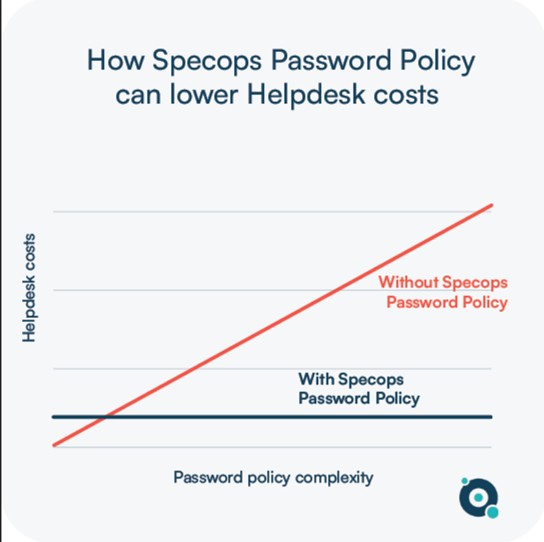
| Without Specops | With Specops |
|---|---|
| Mandatory password resets | Breached password detection eliminates arbitrary resets |
| No guidance at password change screen | Dynamic feedback guides users to strong passwords |
| Helpdesk calls spike with each policy change | Users succeed on their first attempt – fewer support calls |
| Users pick weak but compliant passwords | Length-based aging encourages users to pick stronger passwords that last longer |
Why strong password hygiene lays the foundation for passwordless
Many organizations see passwordless as the ultimate destination and view password management as a temporary waypoint they’d rather skip. But rushing to passwordless without solid password hygiene is like building a house on unstable ground. Passwordless authentication still relies on your existing identity infrastructure and account security. If those accounts are already compromised through weak or breached passwords, you’re simply creating a convenient entry point for attackers who already have credentials.
This is where Specops Password Policy becomes a strategic investment rather than a stopgap measure. The tool doesn’t just improve your current password security; it builds the foundation your passwordless future requires. By continuously monitoring for breached passwords and ensuring every account starts from a secure baseline, you’re eliminating the compromised credentials that would undermine your passwordless rollout.
Even better, Specops only forces changes when a breach is detected, meaning you’re not constantly disrupting users while you plan your passwordless transition. You get robust security today while laying groundwork that makes your eventual passwordless implementation actually secure, not just convenient.
How Specops Password Policy changes the equation
Specops Password Policy takes a different approach. Instead of just enforcing rules and leaving users to figure it out, it actively helps them succeed while maintaining higher security standards. Here’s how three specific features deliver measurable ROI:
Dynamic feedback reduces friction
When users change their password, they see real-time feedback at the password reset screen. Not cryptic error messages after they’ve already submitted, but actual guidance while they’re typing. This seemingly small change has a massive impact. Users get their passwords right on the first or second attempt instead of the fifth.
They don’t need to call the helpdesk to decipher what “does not meet complexity requirements” actually means. This means fewer tickets, faster password changes, and users who aren’t frustrated before they’ve even logged in for the day.
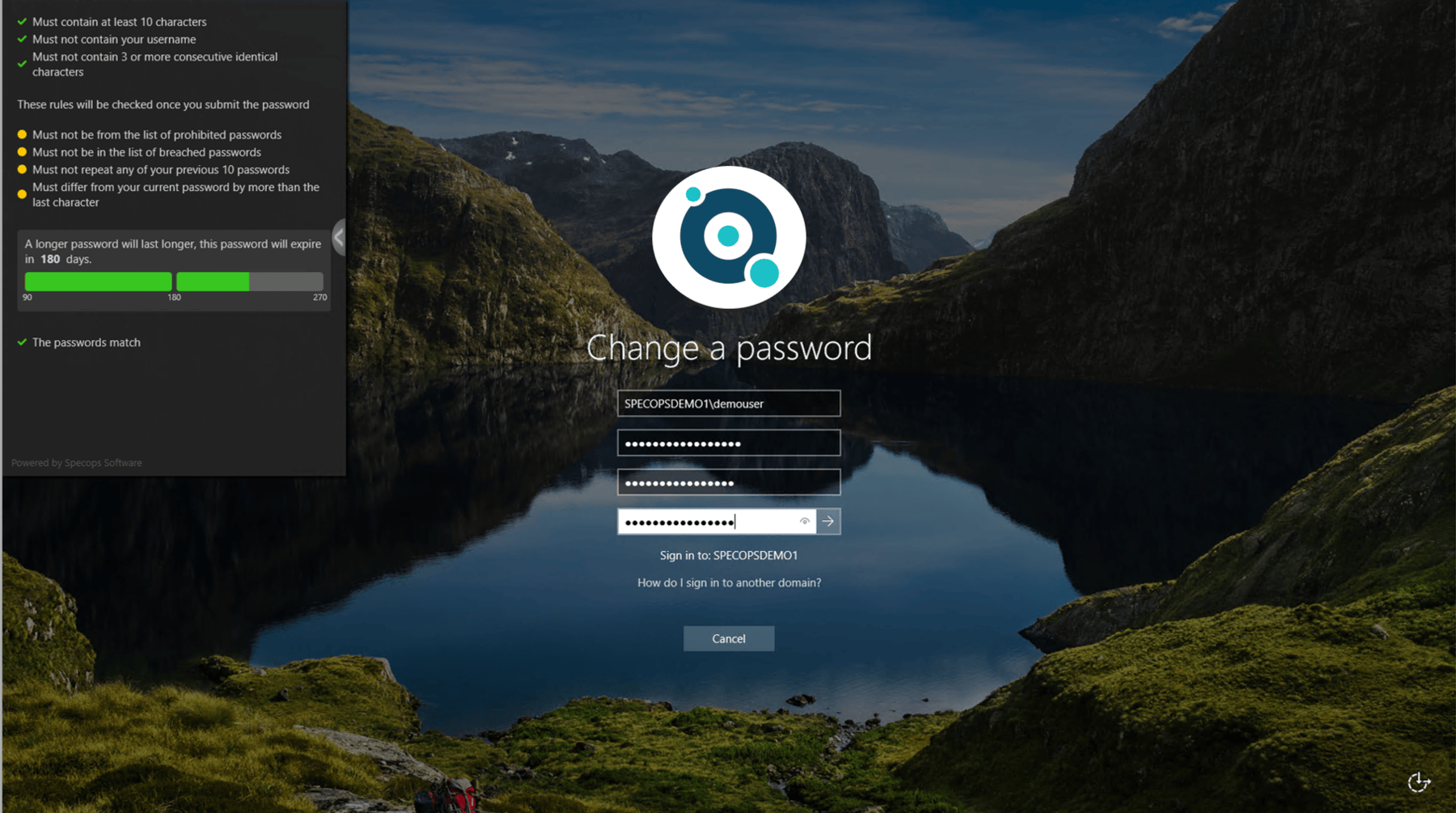
Specops client provides dynamic feedback.
Length-based aging rewards stronger passwords
Length-based aging directly challenges the old “change your password every 90 days” mandate. With Specops, you can set policies where longer, stronger passwords last longer. A 20+ character passphrase might be valid for a full year, while a 10 character password expires in 90 days. You’re essentially rewarding users with strong passwords by letting them avoid the hassle of regular resets.
This aligns perfectly with NIST guidelines, which have moved away from mandatory periodic password changes. But more importantly, it reduces your helpdesk burden. Users who choose stronger passwords get rewarded with fewer mandatory resets. That means fewer support calls and less productivity loss from users locked out of their accounts.
Breached password detection eliminates unnecessary resets
This is where Specops really separates itself from basic password policy enforcement. The tool continuously checks your Active Directory against a database of over 4.5 billion compromised passwords. When a breach occurs that affects your users, they’re prompted to change their password immediately.
Because Specops identifies real security threats, you can eliminate arbitrary password expiration entirely for users with uncompromised credentials. You’re not forcing thousands of users to reset passwords “just because it’s been 90 days.” You’re only intervening when there’s an actual risk. Fewer forced resets mean fewer helpdesk tickets, while your security posture improves.
This approach follows NIST’s recommendation that passwords should only be changed when there’s evidence of compromise – guidance that many organizations want to follow but can’t without the right tools.
Beat the password policy cost paradox
Yes, Specops Password Policy will help you block weak passwords and prevent breaches. But if that’s all you’re measuring, you’re missing half the ROI story.
When you add up the reduction in helpdesk tickets, the decrease in productivity loss from locked-out users, and the time your IT team saves not manually managing password policies, the numbers become compelling even before you factor in breach prevention.
Want to see how Specops Password Policy can improve your security and reduce costs? Book a demo to see the tool in action.
Last updated on January 19, 2026